
480i · 576i → 1080p · $0.35 / MIN
AI video
AI video
enhancement.
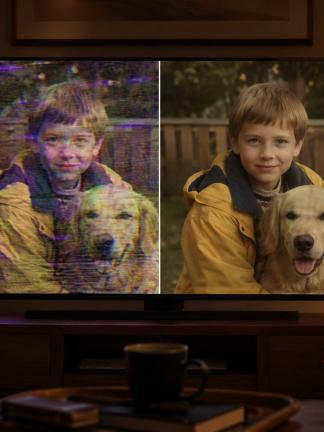
Upscale standard-definition video (480i NTSC, 576i PAL) to true 1080p FullHD with detail enhancement and noise reduction. Upload your own video files to start, or enhance portions of a capture from your dashboard before your digitization order is completed. $0.35 per minute for your own files; from your dashboard, $0.30 per minute on Advanced captures or $0.35 on Basic captures (including the Advanced re-scan); Advanced deinterlacing is included for interlaced sources.
First, a perspective
Old tape will not look like a 2026 phone.
And that’s not what AI Enhancement is for. Here’s the honest frame before we get into specifics.
Standard-definition tape was a marvel in 1995. In 2026, even the cheapest smartphone records 4K. Don’t expect AI Enhancement to close that gap. Your VHS, Hi8, Digital8 or MiniDV footage, however carefully restored, will not look like footage shot last week on a $300 phone. The medium has a hard ceiling we cannot push past.
You also can’t travel back and refilm those moments with modern gear. Until that becomes an option, the tape you have is the tape you have, and AI Enhancement is about getting the most out of it. The goal is not to turn an old recording into a new one. The goal is to make it hold up on the screens you actually watch today: a modern TV, a tablet, a phone. The next time nostalgia hits and you want to share your videos with family and friends, like the clip of your now-grown child’s first steps, a video they can play on a phone or TV is a lot more practical than mailing them a cassette, a VCR and a CRT television.
And the pace of progress is striking. Two or three years ago, getting a few seconds of watchable upscaled video out of an AI was treated as a breakthrough. Remember the Will Smith eating spaghetti clip? That was state of the art. Today AI generates entire realistic videos from a one-line text prompt. The tools for restoring old video sit on the same curve. What we deliver today is honest and useful; what we will deliver a year or two from now will be noticeably better. The gap between your source and the AI output will narrow, even if the gap between your source and a modern phone never will. But while the AI keeps improving, your tape keeps degrading. The clip you have been meaning to digitize may not survive long enough to meet the better AI you are waiting for. Those moments do not have unlimited time on a magnetic shelf, and the tape is the only place they live. Digitize now, while the source still holds.
i. What the AI does
Three specific things.
It’s not magic. It’s trained AI doing three specific operations on every frame.
-
Resolution upscale
Standard-definition source (480i/576i) becomes 1920×1080 progressive output. The AI predicts plausible detail at higher resolution based on training over millions of video frames.
-
Denoise
Analog tape grain, compression artifacts and luminance noise are reduced while real detail is preserved. The image is cleaner without looking plastic.
-
Detail reconstruction
The AI fills in plausible high-resolution detail where the source was low-res: cleaner edges, sharper facial features, more surface texture. It’s statistical guesswork trained on millions of frames, so the same AI can produce a strong reconstruction on one clip and a softer, over-smoothed result on another. Works best on faces and well-lit scenes; less dramatic on shadowy or fast-motion footage. See Honesty and Examples below for the typical tradeoffs.
❖ ❖ ❖
Regular A/V Capture
Advanced Scan + AI
❖ ❖ ❖
ii. Two ways to use it
Upload, or mark portions in the dashboard.
AI Enhancement is a separate upload-based product, with one shortcut for existing customers.
-
On video files you already have
Have old MP4s, AVIs or MOV files from earlier digitization? Upload them through our AI Enhancement flow: uploading creates the order. You pay $0.35 per minute for the whole file, and we enhance the entire video. If the source is interlaced, Advanced deinterlacing is applied automatically before AI processing. No extra charge.
-
On tapes we already captured
As soon as your Basic or Advanced capture is ready, the video appears in your dashboard. From there, until the order is completed, you can mark portions for AI Enhancement: $0.30/minute on an Advanced capture, $0.35/minute on a Basic capture (the $0.05 Advanced re-scan it needs is included). You pay only for what you actually want enhanced, not the entire tape.
AI doesn’t invent content that wasn’t recorded. It cleans what the camera caught.
iii. Realistic expectations
What to expect, honestly.
Best case, average case, and limits. We’re straight about all three.
-
Best results: clean source, faces, daylight
Well-lit footage with people and clear detail upscales beautifully. MiniDV, Digital8 and properly-captured Hi8 give the AI the most to work with. Faces in particular look dramatically better.
-
Good results: most standard home video
Average VHS family footage gets noticeably sharper and cleaner. Color is more stable. Old footage feels modern without losing its character.
-
Limited results: heavy noise, fast motion, dark scenes
If the source has constant tape noise, severe color loss, or rapid camera motion, AI has less to work with. Improvement is real but smaller. Advanced scan first gives the AI a cleaner source.
-
Skip AI: heavy shake, constant zooming
If the source is mostly handheld with heavy camera shake and constant zoom-in / zoom-out, AI Enhancement will likely disappoint you. For tapes that are mostly shaky zoom-heavy footage, we recommend skipping AI on those sections: a clean Advanced capture at native resolution will hold up better than an unstable 1080p upscale.
-
What AI doesn’t do
It doesn’t invent content that wasn’t recorded. Out-of-focus footage stays out of focus. Missing chunks of tape can’t be reconstructed. Heavy mold damage isn’t fixed by AI. The general rule: the more the AI has to invent, the worse the result. Good source is what makes AI Enhancement land.
iv. Honesty
AI is not magic. We say so up front.
Most services show only the wins. We don’t. Here’s what we want every customer to understand before paying for AI Enhancement.
-
We do not guarantee any specific result
AI output quality is shaped by two things we don’t fully control: the condition of your source video, and your personal taste in how vintage footage should look. We work hard on the technical side, but we cannot promise that any particular tape, file, or clip will enhance to your satisfaction. If anyone in the industry tells you they can guarantee this, they are overselling.
-
Source quality drives the ceiling
Clean, well-lit footage with clear detail responds well. Heavy tape damage, dark or blurry scenes, severe noise, fast motion, indistinct faces, low-resolution source: all of these reduce what AI can recover. We can read the rough outcome from a short sample, but a tape in poor condition has a ceiling, and AI cannot break it.
-
The AI look is a matter of taste
Some viewers love the cleaner, sharper, more modern feel. Others prefer the original analog texture and find AI output too smooth, too polished, or too “wrong” for vintage footage. Both reactions are valid. AI is not the right call for every archive or every viewer.
-
We can’t refund completed AI work
Once AI processing on a clip is finished, the GPU time and operator labor have been spent. We can’t refund those costs based on a subjective evaluation of the output. See our Cancellation and Refund Policy for the full rules. This is precisely why we strongly recommend sampling first.
Our recommendation: for AI added to a Digitization order, the first 3 minutes are free, so sample on a clip that matters to you and pay nothing for the trial. Review the result honestly. If you like it, mark more portions and pay only for those minutes ($0.30/min on Advanced captures, $0.35/min on Basic). If you don’t, you have spent nothing and your original capture stays exactly as it was. We cannot refund AI work after it’s done, so the sample is your protection.
v. Examples
Where AI lands. Where it slips.
Same AI, different outcomes. The examples below show typical successful and typical problematic frames.
Where AI tends to slip


Where AI lands


❖ ❖ ❖
The typical AI artifacts, in detail
None of these is a sign of broken processing. They are the known cost of upscaling and detail reconstruction on imperfect source. A sampling pass shows you which of these show up on your specific footage.
Faces and people
- Plastic skin. Excessive smoothing of facial texture. Pores, fine lines and natural skin character flatten into a polished, wax-doll look that doesn’t match the era of the footage.
- Eye issues. Eyes are the most reconstructed part of any face: irises sometimes look slightly wrong, pupils inconsistent in size, gaze direction subtly off, or eyes that catch unnatural highlights the camera didn’t actually record.
- Indistinct faces drift between frames. If the original face was small, far from the camera, or motion-blurred, AI fills in plausible features. Across consecutive frames those guesses can vary, so the same person’s nose, jawline or hairline can shift slightly. A close relative may notice it; a casual viewer may not.
- Hair detail loss. Fine hair flattens into a halo or a brush-stroke texture. Curls and individual strands disappear into broader shapes.
Small objects and detail
- Jewelry and ornaments. Necklaces, rings, earrings and small accessories are reconstructed as plausible shapes that may not match the actual items.
- Fabric patterns. Plaids, prints and weave textures get re-synthesized. The result looks like a fabric pattern, just not necessarily the exact pattern that was filmed.
- Background detail. Furniture grain, wallpaper, distant trees and similar background texture is rendered as plausible but invented detail.
Text, logos, signs
- Small text scrambled. Captions, license plates, signs, t-shirt prints, book spines: anything text-sized in the frame is often rendered as similar-shaped letters that don’t spell the original word.
- Logos misrendered. Brand marks come out close-but-wrong. The letter shapes and colors look right at a glance, but a logo you know well will read as off.
- Handwriting. Cards, signs and notes in the footage almost never render correctly.
Overall image quality
- General softness. AI may produce a softer image than a sharper Advanced capture would. Sharper isn’t the same as resolved detail.
- Halo and edge artifacts. High-contrast edges sometimes show subtle halos or rings that weren’t in the original.
- Color drift. Saturation can shift, especially on skin tones and bright reds. Color stability is generally better than the source, but not always a perfect match to memory.
vi. Pairings
How AI pairs with other services.
AI needs a clean source. Here’s what that costs depending on what you originally ordered.
-
Best (cheapest path): Advanced scan + AI
$0.30 per minute, first 3 minutes free. Advanced capture already gives the AI the cleanest possible analog source, so AI alone is enough on top. If you have a tape with any visible quality issues and you know you might want AI later, ordering Advanced upfront is the cheapest path to a good AI result. Use the free 3 minutes to sample on a clip you actually care about before committing more.
-
Started with Basic? You’ll re-scan to Advanced first
$0.35 per minute combined ($0.05 Advanced re-scan + $0.30 AI). There is no “Basic + AI” path directly: AI needs an Advanced base on the same clip to produce a clean result. From your dashboard, mark the portions you want enhanced and we apply the re-scan and AI in sequence. The first 3 minutes are fully free here too: both the re-scan and the AI on the sample cost you nothing. You still pay only for the minutes you mark beyond the sample, but the per-minute rate is higher than if you’d ordered Advanced from the start.
-
AI alone (your own files)
$0.35 per minute, billed from minute one. No tape involved. For digital files you already own, AI runs on the whole file you upload. No free sample minutes here, since there’s no Digitization order to anchor them to. Quality depends entirely on your source file. We’ll be honest about expected results before processing; to test on your own footage, upload a short file first (uploads start at 5 minutes).
Billed only on the minutes you select.
On videos we digitized, mark specific scenes after preview: you’re never charged for footage you didn’t enhance, and the first 3 minutes are free. A file you upload yourself is enhanced and billed as a whole.
See Pricing
vii. Delivery
How AI-enhanced video gets to you.
Two scenarios, two delivery rules. Pick the row that matches your order.
-
AI added to a Digitization order
You ordered Basic or Advanced and marked portions for AI Enhancement from your dashboard before the order was completed (with discs, before they were burned). The enhanced version joins that order: in your cloud, or on a BluRay disc if you chose discs, even if the rest of the order went on DVD, because 1080p output doesn’t fit on DVD by spec. Source MP4 download follows the Digitization rule: 30 days from order completion with discs, or throughout your cloud subscription plus 30 days if it isn’t renewed. Once the order is completed, AI can no longer be added to it: download your files from the dashboard and upload them as a standalone AI Enhancement order, or email support@savevhs.com and we’ll help.
-
Standalone AI Enhancement (you uploaded your own files)
No Digitization order, no cloud subscription, no disc. We deliver an MP4 download with a 30-day window starting from order completion. Pull a local copy before the window closes.
-
Why no DVD?
AI Enhancement output is 1080p FullHD. DVD is a standard-definition format by spec and physically can’t carry FullHD. Wherever a disc ships for AI output, it’s BluRay.
Q. & A.
AI Enhancement questions.
The six asked most often. A longer set→ covers everything else.
Yes, and we strongly recommend it. For AI added to a Digitization order, the first 3 minutes are free: mark a short clip from your dashboard, see the result, then decide whether to mark more. Look at the result honestly: do faces look right? Is the level of softness or smoothing acceptable to you? For standalone uploads of your own files, billing starts from minute one because there’s no Digitization order to anchor the free minutes to; to test, upload a short file first (uploads start at 5 minutes).
If you sampled first (which we strongly recommend) you simply stop there and don’t mark additional portions. For AI on a Digitization order, the first 3 sample minutes are free, so you’ve spent nothing. The original Digitization capture stays in your account untouched: AI Enhancement is an additive layer, never a replacement. If AI processing on a clip is already complete, we can’t refund the GPU time and operator labor that went into it. See our Cancellation and Refund Policy for the full rules.
On our own GPU infrastructure. Your video isn’t sent to third-party AI services. Privacy practices are described in our privacy policy.
It depends heavily on the length of your video and our current load: anywhere from a few hours to a few days. We’ll let you know when it’s ready.
Not as part of our standard service. Colorization is a separate, more involved process. Contact us if you specifically want this. We may be able to recommend a specialist or quote it as restoration work.
Most common video containers and codecs: MP4 (H.264, H.265), MOV, AVI, MKV, MPG. Files can be 5 to 60 minutes long and up to 1 GB. If you have something unusual (raw DV, ProRes, etc.), or a file outside those limits, contact us before ordering.
Bring your old footage to today’s screens.
Realistic, transparent, billed only on the minutes you choose. Still deciding? Read our honest take on what AI upscaling actually does for old home videos.
Get Started